
.jpg)
- Why Video Testimonials Are a Conversion Asset, Not Just a Nice-to-Have
- What Separates a Useful Video Testimonial from a Forgettable One
- Step 1 — Build Your Target List of the Right Customers to Ask
- Step 2 — Set Up Your Collection Infrastructure with Moast
- Step 3 — Write Outreach That Actually Gets Responses
- Step 4 — Automate Your Follow-Up Sequence
- Step 5 — Review, Approve, and Organize Your Testimonials
- Step 6 — Publish Testimonials Where They Drive the Most Impact
- Step 7 — Use Video Testimonials in Your Paid Ad Creative
- Step 8 — Build a Repeatable System That Runs Continuously
- Common Mistakes to Avoid
- Start Building Your Testimonial Library Today
Why Video Testimonials Are a Conversion Asset, Not Just a Nice-to-Have
If you run a Shopify store, you already know that getting traffic is only half the battle. The harder problem is converting visitors who land on your product pages but don't yet trust you enough to buy. That trust gap is where most ecommerce revenue gets lost — and it's exactly where customer video testimonials do their best work.
Text reviews are table stakes at this point. Every store has them. But a real customer, on camera, explaining in their own words what your product did for them — that's a different level of social proof. It's harder to fake, harder to dismiss, and far more emotionally compelling than a star rating and a sentence or two of text.
According to Baymard Institute research, shoppers heavily scrutinize product pages for trust signals before committing to a purchase. Video testimonials are among the strongest trust signals you can place on a page because they combine visual authenticity, real human emotion, and specific product outcomes in a format that's easy to absorb quickly.
The brands winning in ecommerce right now are not just collecting reviews — they're building libraries of customer video content and deploying it strategically across their product pages, landing pages, email campaigns, and paid ads. This guide gives you the exact process to do the same, from identifying the right customers to ask, to setting up a collection system that runs on autopilot, to publishing testimonials where they'll actually move your conversion rate.
What Separates a Useful Video Testimonial from a Forgettable One
Before you start collecting, you need to know what you're aiming for. Not all video testimonials are created equal. A vague "I really love this product, highly recommend" video is marginally better than nothing. A specific, structured testimonial that walks through a real problem and a real outcome is a conversion asset that can generate revenue for years.
The anatomy of a high-converting video testimonial
The best customer video testimonials follow a loose three-part structure, even when the customer doesn't know they're following it:
- The before: What was the customer's situation, problem, or frustration before they found your product? Specificity here is everything. "I was struggling to find a moisturizer that didn't break me out" is infinitely more compelling than "I needed a good skincare product."
- The after: What changed after they started using your product? Again, specific outcomes beat vague praise. "My skin cleared up within two weeks and I've had zero breakouts since" is a testimonial. "My skin is so much better now" is noise.
- The recommendation: Would they recommend it, and who specifically would benefit? This is the part that speaks directly to prospective customers who see themselves in the reviewer's situation.
Production quality: good enough beats perfect
One of the biggest mistakes brands make when they start thinking about video testimonials is assuming they need professional production. They don't. In fact, over-produced customer testimonials often backfire because they feel staged and scripted — which defeats the entire purpose.
What you want is authentic. A customer filming themselves on their iPhone in decent lighting, speaking naturally and directly to the camera, will outperform a polished studio shoot almost every time. According to HubSpot's marketing research, authenticity is a top driver of consumer trust, and audiences have become highly attuned to the difference between genuine endorsement and manufactured content.
Target video length of 45 to 90 seconds. Short enough that a product page visitor will actually watch it. Long enough for the customer to say something meaningful. If you get a two-minute video that's genuinely great, keep it — but 90 seconds is your sweet spot.
Step 1 — Build Your Target List of the Right Customers to Ask
The single biggest lever on your video testimonial response rate is who you ask. Most brands make the mistake of sending a blanket request to their entire customer list and then wondering why almost nobody responds. The customers most likely to record a video for you are not random — they're a specific, identifiable group, and you should spend time finding them before you send a single outreach email.
Who belongs on your target list
- Repeat purchasers: A customer who has bought from you more than once has already demonstrated loyalty. They like you enough to come back. That's a strong signal they'd be willing to advocate for you publicly.
- High-rating reviewers: Anyone who left a 4- or 5-star text review has already taken an action on your behalf. They've demonstrated they're the type of person who does this. Ask them to take it one step further with a video.
- Social media engagers: Customers who tagged your brand, left a comment on a post, or shared your product organically have already shown they're comfortable putting your brand in front of their network. They're natural advocates.
- Positive email responders: If someone replied to your post-purchase email sequence with something enthusiastic — even just "I love this, thank you" — flag them. That's a warm lead for a testimonial request.
- Long-tenure customers: If you have subscribers who have been buying from you for six months or more, they have a track record with your product and are more credible voices than first-time buyers.
How to build this list in Shopify and Klaviyo
In Shopify, you can filter your customer list by order count and purchase history to identify repeat buyers. Export that list and cross-reference it with your review platform to find the overlap between repeat buyers and 5-star reviewers — that group is your tier-one outreach targets.
If you're using Klaviyo for email marketing, you can build a highly targeted Klaviyo segment that dynamically updates based on purchase behavior, review submission, and email engagement. This means your testimonial outreach list stays fresh automatically — new customers who meet the criteria get added over time without any manual work.
Start with 30 to 50 people for your first round. You don't need a massive list to build a strong testimonial library. If 15 to 20 percent of those people submit a video — which is realistic with good outreach — you'll have five to ten videos from a single send. That's enough to meaningfully impact your product pages.
Step 2 — Set Up Your Collection Infrastructure with Moast
Manual testimonial collection — chasing customers individually over email, asking them to send files, then trying to figure out how to embed video on your Shopify store — is how brands collect two or three testimonials and then give up. If you want a system that produces a steady stream of customer videos without constant manual effort, you need the right tool.
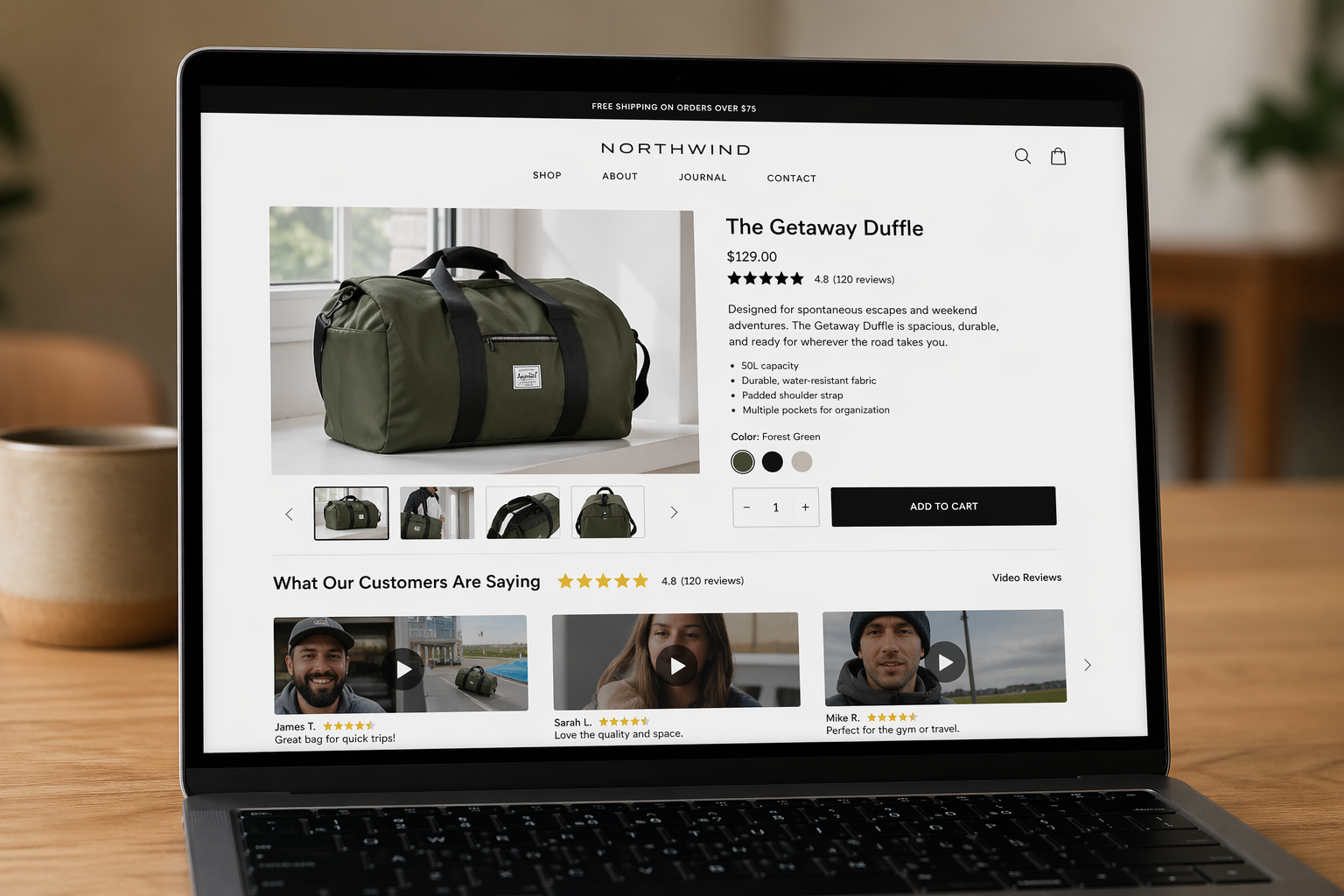
Moast is built specifically for Shopify brands that want to collect, manage, and publish customer video testimonials at scale. It handles the entire workflow: the customer-facing submission experience, the video storage and management, and the embedding infrastructure that gets your testimonials onto product pages and landing pages without custom development work.
Why Moast is the right tool for Shopify brands
There are generic video collection tools out there, but Moast is purpose-built for ecommerce. The submission experience is designed to be frictionless for customers — no account creation, no app downloads, just a simple link that takes them to a guided recording flow on their phone or desktop. The guided prompts built into the submission flow are designed to produce structured, useful testimonials rather than rambling videos, which means less editing work on your end.
On the backend, Moast gives you a clean library to review submitted videos, approve or reject them, and organize them by product. The Shopify integration means you can assign testimonials directly to specific product pages and publish them with a widget that drops into any theme without needing a developer.
Getting Moast set up on your store
- Install the Moast app through your Shopify admin
- Connect your store and configure your brand colors and logo so the submission experience matches your brand
- Set up your video request campaign — define the product or products you're collecting testimonials for and write the prompts customers will see when they record
- Configure your trigger: post-purchase automation, post-review follow-up, or manual outreach to a specific list
- Test the submission flow yourself before sending it to customers — go through the experience as a customer would to make sure it's smooth
The questions you build into your submission prompts are critical. Vague open-ended prompts produce vague videos. Give customers a clear structure to follow. The three questions that consistently produce the best testimonials are: What problem were you trying to solve before buying this? What happened after you started using it? Who would you recommend this to and why? For a full breakdown of what to ask, see the best questions to include in your video testimonial request.
Step 3 — Write Outreach That Actually Gets Responses
Your collection system is only as good as the emails that drive customers into it. Most testimonial outreach fails not because customers don't like the brand — they do, that's why they're on the list — but because the ask feels too big, too vague, or too one-sided.
The psychology of a good testimonial ask
Think about what you're asking a customer to do. Record a video of themselves, on camera, talking about a product, and send it to a brand they bought from. That requires overcoming a fair amount of friction: self-consciousness about being on camera, uncertainty about what to say, the time required, and the question of what's in it for them.
Your outreach email needs to address all of those friction points directly. Make the ask feel small and low-stakes. Tell them exactly what to say. Give them a clear reason to do it. And make the submission process feel effortless.
The outreach formula that works
- Open with something personal: Reference their specific purchase, or acknowledge that they've been a customer for a while. Generic mass-email openers kill response rates immediately.
- Make the ask concrete and bounded: "A quick 60-second video" is a much easier yes than "a video testimonial." People can picture 60 seconds. "Testimonial" sounds like work.
- Give them the script: Include the three questions you want them to answer. Removing the "what do I even say?" friction dramatically increases completion rates.
- Offer a meaningful incentive: Discount code, store credit, free product, or early access to a new launch. The incentive signals that you value their time and makes the exchange feel fair. Even a 10 to 15 percent discount code converts significantly better than no incentive at all.
- One clear CTA, nothing else: A single button or link to the Moast submission page. No options, no alternatives, no distractions.
Timing your outreach
Send your first request 7 to 14 days after confirmed delivery, depending on your product category. For consumables or skincare, 14 days gives the customer time to see real results. For apparel or home goods, 7 to 10 days is usually enough time to have formed an opinion.
According to Shopify's post-purchase email guidance, timing and personalization are the two biggest factors in post-purchase email performance. Send too early and the customer hasn't had a chance to experience the product. Send too late and the initial excitement has faded.
For more detail on how to phrase the ask without it feeling pushy or transactional, read the full guide on how to ask customers for video testimonials.
Step 4 — Automate Your Follow-Up Sequence
The majority of video testimonial submissions do not come from the first email. They come from the follow-up. Most customers who intend to submit a video simply forget — life gets in the way. A single well-timed follow-up email can double your response rate without any additional list-building or outreach effort.
Building a two-email sequence
Keep your follow-up sequence simple: the initial request, then one follow-up email five to seven days later for anyone who opened the first email but didn't submit. If you have the ability to segment by open behavior in your email platform, use it — sending a follow-up to someone who never opened the first email often isn't worth the risk of an unsubscribe.
The follow-up email should be lighter in tone than the original ask. It's a gentle nudge, not a second sales pitch. Something as simple as: "Hey, still interested in sharing your experience? It takes under two minutes and we'd love to feature you." Reattach the same submission link and keep everything else out of the email.
Integrating with Klaviyo flows
If you're running post-purchase flows in Klaviyo, the cleanest integration is to add your video testimonial request as a branch that fires after your review request email. Customers who have left a high-star rating are your warmest leads — they've already demonstrated they're willing to take an action on your behalf. Catching them in the same flow while they're already in a positive mindset about the brand is highly effective.
Use Klaviyo's conditional flow logic to suppress the follow-up for anyone who has already submitted a video. Nothing damages the customer relationship faster than pestering someone who already did what you asked. Make sure your Moast integration passes submission data back to Klaviyo so your flow logic stays accurate.
Step 5 — Review, Approve, and Organize Your Testimonials
Once submissions start coming in, you need a review process before anything goes live on your store. Not every video will be usable — some will have bad audio, some will be too vague, some customers will go off-topic. That's normal. Your job at this stage is curation, not just collection.
What to look for when reviewing submissions
- Audio clarity: If you can't easily understand what the customer is saying, the video won't work on a product page. Background noise, wind, or muffled audio are disqualifiers unless the content is exceptional.
- Specificity: Does the customer mention your product by name? Do they describe a specific outcome? Specific videos convert better than generic ones.
- Length: Anything under 20 seconds is probably too short to be useful. Anything over two and a half minutes will need trimming or should be evaluated on whether the full length is worth it.
- On-brand tone: Is the customer's energy and presentation consistent with your brand positioning? A high-end skincare brand probably shouldn't lead with a testimonial shot in a chaotic kitchen with kids screaming in the background — even if the content is good.
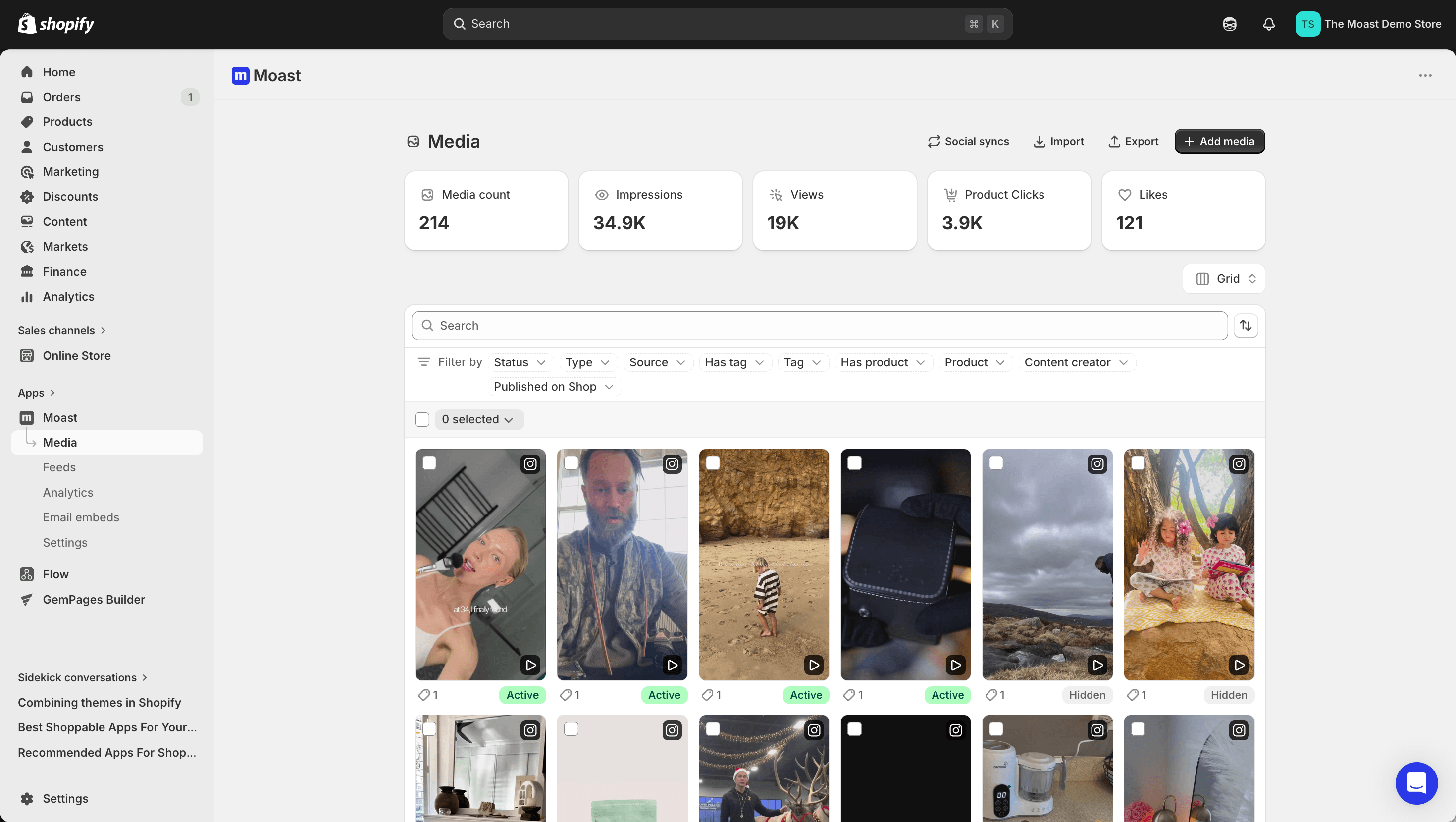
In Moast, you can review, approve, reject, and organize all incoming videos from a single dashboard. Assign them to specific products as you approve them so your library stays organized as it grows.
Responding to customers who submitted
Always send a thank-you to every customer who submitted a video, whether you end up using it or not. A short, genuine email acknowledging their time and letting them know their testimonial will be featured on your store is a small gesture that creates significant goodwill. These customers are already your best advocates — treat them accordingly and they'll likely buy from you again.
Step 6 — Publish Testimonials Where They Drive the Most Impact
Collecting video testimonials is half the job. Where you publish them determines how much conversion lift you actually see. Placement strategy matters as much as content quality — a great testimonial buried at the bottom of a page no one scrolls to is essentially wasted.
Product pages: your highest-priority placement
Product pages are where purchase decisions get made, which makes them the most valuable real estate for video testimonials. The optimal placement depends on your theme and product page layout, but generally you want testimonials visible without requiring too much scrolling. Just below the product description, near the add-to-cart section, or in a dedicated social proof section above the fold on desktop are all strong positions.
Match testimonials to specific products. A video testimonial for your best-selling moisturizer should appear on the moisturizer product page, not on a generic testimonials page that nobody visits. Contextual relevance is what makes video testimonials convert — the visitor sees someone who bought exactly what they're considering and heard exactly the outcome they're hoping for.
Other high-impact placements
- Homepage: A testimonial carousel or featured video in your homepage's social proof section builds brand-level trust for new visitors before they even reach a product page.
- Collection pages: Embedding a testimonial strip above or within your product grid can lift clicks to individual product pages, especially for visitors browsing categories they're unfamiliar with.
- Landing pages for paid traffic: Cold traffic arriving from Facebook or Google ads has zero brand familiarity. Video testimonials on paid landing pages are one of the highest-ROI places to deploy customer videos because the trust deficit is largest there.
- Email campaigns: Linking to a video testimonial from a promotional email — "See what customers are saying" — is a proven way to warm up a segment before a sale or product launch.
- Abandoned cart flows: A video testimonial in an abandoned cart email addresses the trust concerns that may have stopped someone from completing their purchase. It's a subtle but effective objection-handler.
For a deeper look at placement strategy across the full customer journey, read about where to use video testimonials in your Shopify store to get the most out of each placement.
Step 7 — Use Video Testimonials in Your Paid Ad Creative
Your video testimonial library is not just a website asset — it's ad creative. Customer-generated video testimonials consistently outperform brand-produced video ads on Meta and TikTok because they look native to the feed and carry authentic social proof rather than obvious marketing messaging.
When you collect a testimonial, consider whether it could work as a short-form ad. The before-and-after structure maps naturally onto ad formats that perform well: hook with the problem, deliver the solution, end with a strong outcome statement. A 45-to-60-second customer video with light captions added can be a highly effective prospecting or retargeting ad with almost no production cost.
Check your platform's usage rights requirements before running a customer video as a paid ad. When you collect testimonials through Moast, the submission flow includes appropriate consent language, but you should confirm the scope of that consent covers paid advertising use before deploying any video in a paid campaign.
According to Shopify's research on user-generated content, UGC-style ads consistently outperform polished brand creative in click-through and conversion rates, particularly with audiences who have had some prior exposure to the brand.
Step 8 — Build a Repeatable System That Runs Continuously
One batch of testimonials is a campaign. What you actually want is a machine that produces new video testimonials on an ongoing basis as you acquire new customers and launch new products. The difference between brands with one or two outdated testimonials and brands with a rich, growing library of customer videos is almost entirely about whether they built a system or just ran a one-time push.

Making testimonial collection evergreen
The goal is to get your Klaviyo post-purchase flow doing most of the heavy lifting automatically. Once you've dialed in your outreach email, your submission prompts, and your follow-up sequence, new customers who meet your targeting criteria should be flowing into the testimonial request pipeline every week without any manual intervention from your team.
Set a monthly calendar reminder to review your Moast library. Look for products with fewer than three active video testimonials and trigger a manual outreach to recent buyers of those products. Rotate fresh testimonials into your highest-traffic product pages quarterly — returning visitors who have already seen your existing testimonials will be exposed to new voices and new outcomes, which reinforces trust rather than becoming background noise.
Tracking the impact
To understand the ROI of your testimonial program, you need to track conversion rates at the product page level. Compare the conversion rate on product pages with embedded video testimonials against comparable pages without them. Most Shopify brands that implement video testimonials strategically see a measurable lift in add-to-cart rate within 30 to 60 days.
You can also A/B test testimonial placement and video selection using Shopify's native theme editor or third-party testing tools. Does one testimonial outperform another on a specific product page? Does placement above the fold convert better than mid-page? These are questions worth testing once you have enough traffic to generate statistically meaningful results.
For inspiration on what a mature testimonial program looks like in practice, explore video testimonial examples from real Shopify stores that are using customer video effectively.
Common Mistakes to Avoid
Even brands that understand the value of video testimonials often undermine their own programs with avoidable mistakes. Here are the most common ones and how to sidestep them.
Asking too broadly
Sending a generic testimonial request to your entire list will produce a low response rate and a batch of mediocre videos from customers who aren't your best advocates. Always start with a curated list of your most engaged, most satisfied customers. Quality of targeting beats volume of outreach every time.
Not giving customers a structure to follow
Customers who are told "just share your experience" will either say nothing or say something vague. Give them the three questions. Walk them through the structure in the submission prompt. The more guidance you provide, the better the output.
Collecting but not publishing
Some brands go through the effort of collecting testimonials and then never actually publish them prominently. Videos sitting in a dashboard nobody looks at generate zero conversions. Make publishing and placement a core part of your process, not an afterthought.
Collecting once and stopping
A testimonial library that doesn't grow becomes stale. Products evolve, customer profiles change, and returning visitors have already seen your existing videos. Build the system to run continuously so your library stays fresh and relevant.
Ignoring mobile viewing experience
A significant portion of your product page traffic arrives on mobile. Make sure the video testimonial widget you're using renders correctly on mobile and that videos load quickly on cellular connections. A slow or broken mobile experience will actively hurt conversion rates rather than help them.
Start Building Your Testimonial Library Today
Customer video testimonials are one of the highest-ROI additions you can make to a Shopify store. They address the trust deficit that kills conversions, they provide authentic social proof that no amount of brand copywriting can replicate, and once you have a system in place, they compound over time as your library grows.
The process is not complicated. Identify your best 30 to 50 customers. Set up Moast to handle the collection and publishing infrastructure. Write personal, specific outreach that makes the ask feel easy and the exchange feel fair. Automate the follow-up so you capture the customers who meant to respond but forgot. Publish the results in the places where your customers are making buying decisions. Track the impact. Refine and repeat.
That's the complete system. You don't need a big team, a production budget, or months of setup time. You need the right process and the right tool. Start with your best customers this week and you'll have your first batch of videos within two weeks.
Related content
.jpg)
.jpg)
Turn your social content into a revenue channel
Turn your TikToks and Reels into shoppable videos and boost conversions by 3.5x.