
The corner pop-up video widget is one of the most effective — and most underused — formats in Shopify. Here's what it is, when to use it, and which apps do it best.
What Is a Corner Pop-Up Shoppable Video?
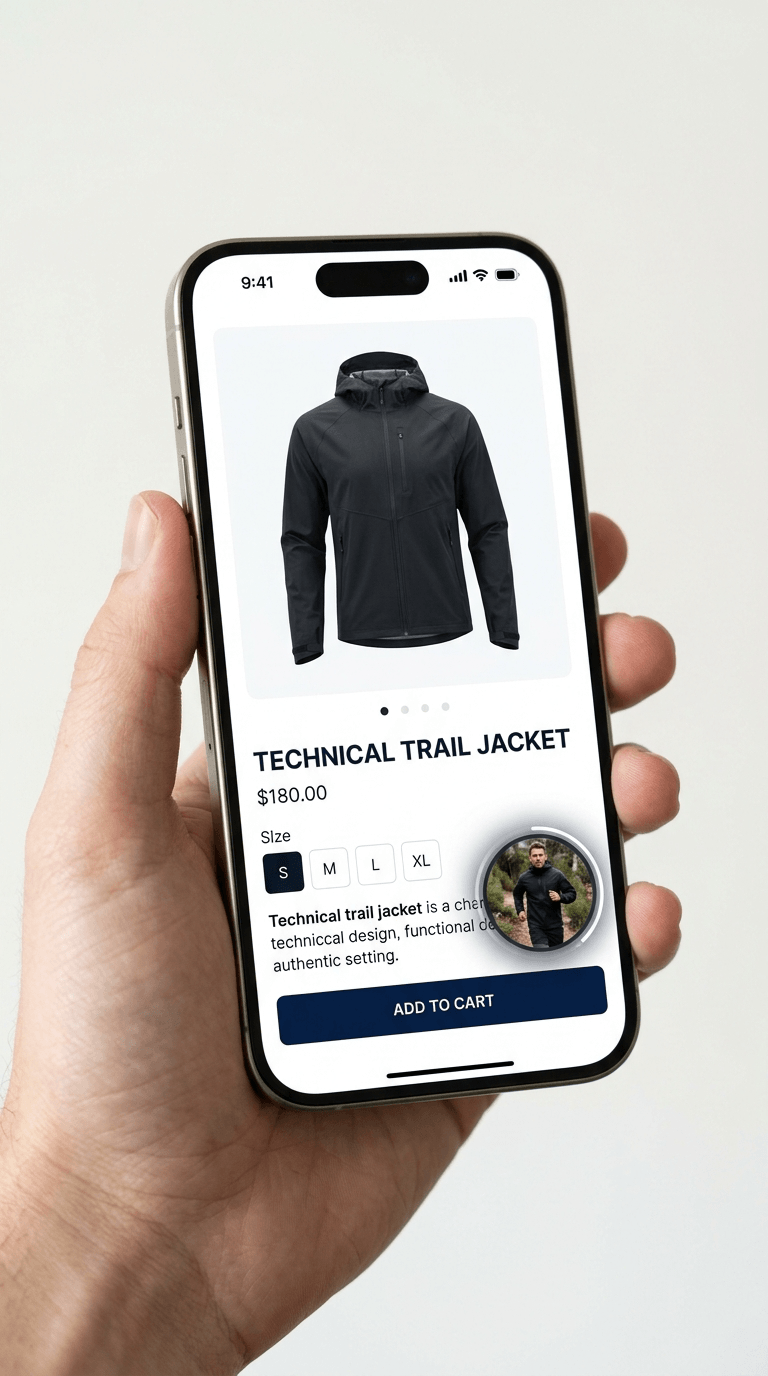
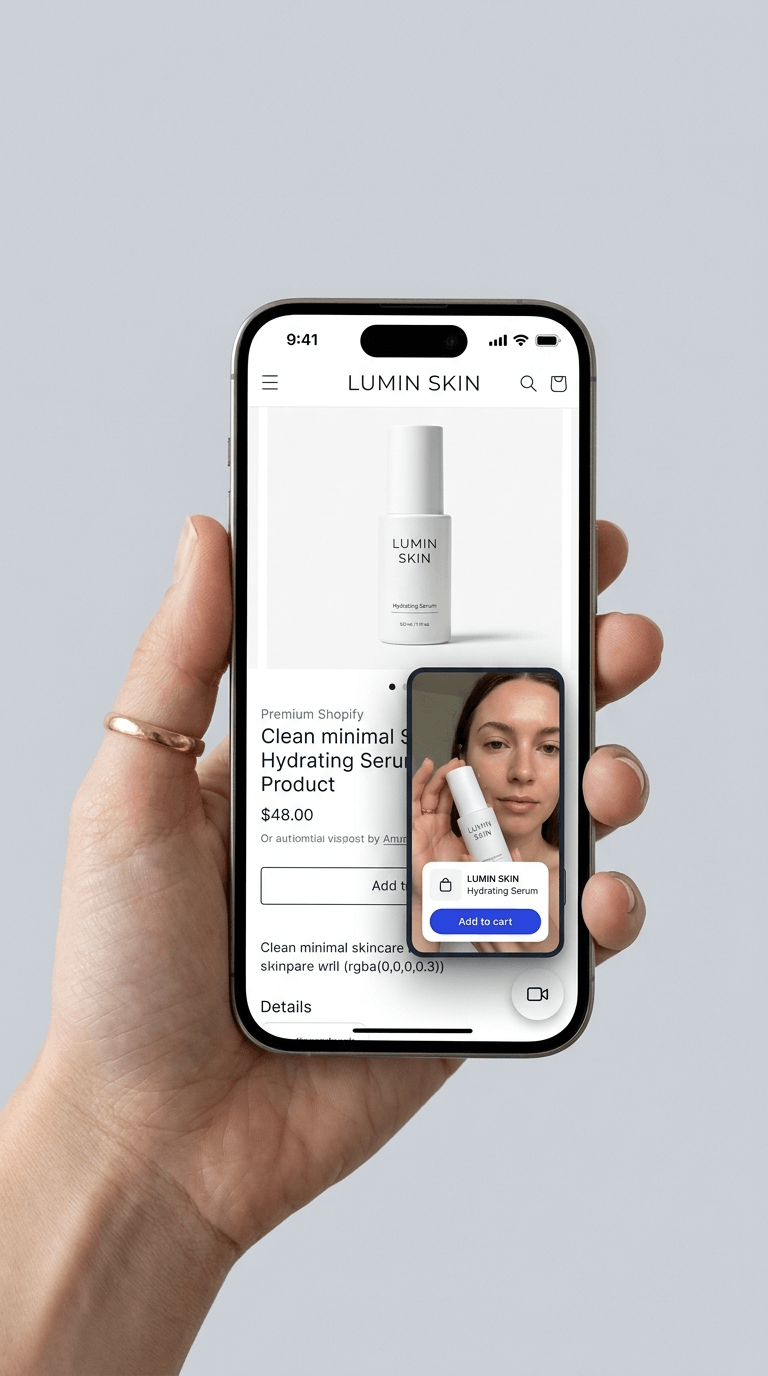
A corner pop-up shoppable video — sometimes called a floating video bubble or floating widget — is a small, persistent video element that sits in a fixed position on your Shopify store, typically in the bottom corner of the screen. When a shopper taps or clicks it, it expands into a video experience with shoppable product tags embedded. When closed, it shrinks back to its compact bubble state without interrupting the page.
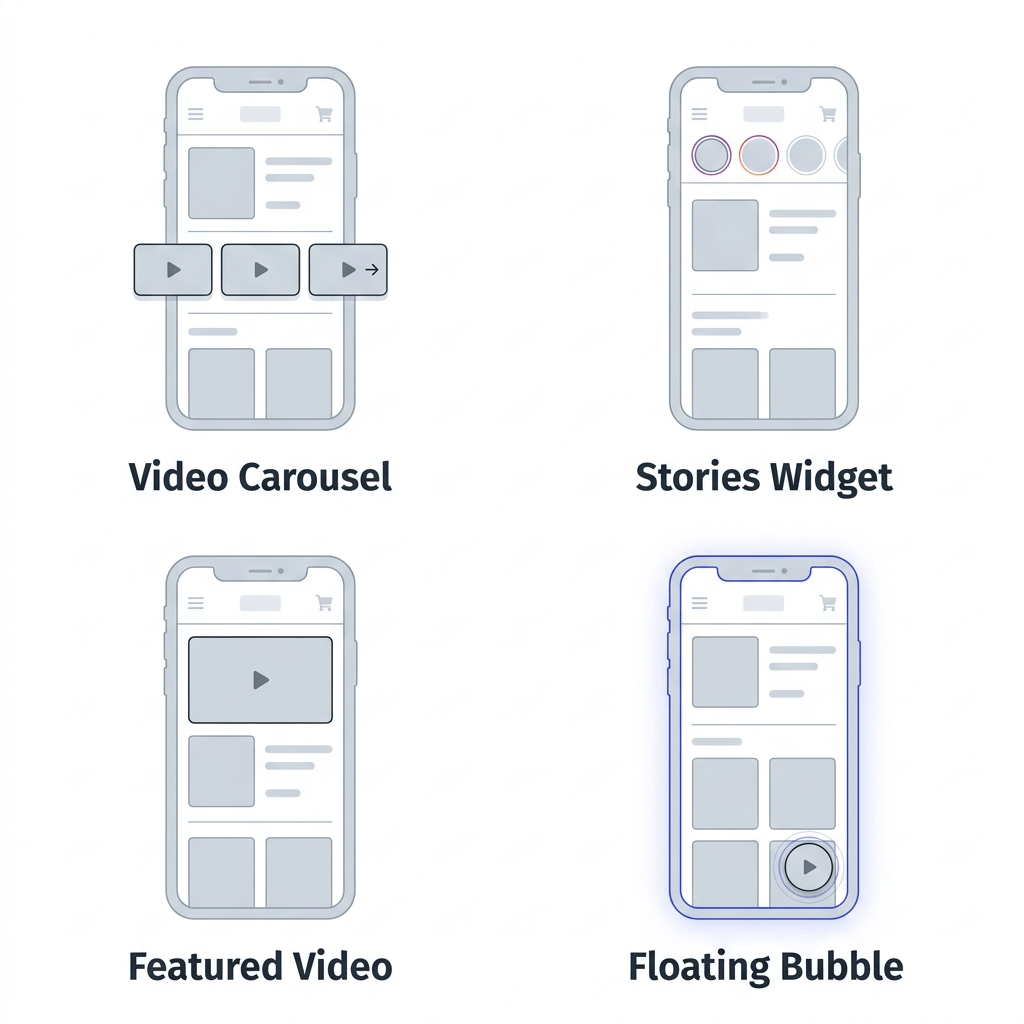
It's one of four main shoppable video widget formats used in Shopify stores today:
- Video carousel — a horizontal row of videos, usually embedded mid-page
- Stories pop-up — story bubbles at the top of a section that expand into full-screen vertical video
- Featured video — a large, single video placement, usually hero-sized
- Corner pop-up / floating bubble — persistent, fixed-position widget that follows the shopper as they scroll
The corner pop-up format is uniquely effective for one reason: visibility throughout the entire page experience. A carousel or stories widget is visible only when a shopper is in that part of the page. A corner pop-up follows them everywhere — from the product description to the reviews section to the add-to-cart button — making the video available at any point in their browsing session, not just one.
When Should You Use a Corner Pop-Up vs Other Video Formats?
The corner pop-up format isn't the right choice for every situation. Here's how to think about when it earns its place and when another format would serve you better.
Use a corner pop-up when:
- Your product page is long and you want video accessible throughout the scroll, not just at one fixed point
- You want to add video to a page without displacing or competing with existing content
- You're deploying video on a page type where embedding mid-content feels intrusive — like a checkout page or a long-form landing page
- You want a lightweight video presence on collection pages without committing to a full embedded section
- Your highest-performing video is a single strong testimonial or demo you want persistently visible
Use a carousel or stories widget instead when:
- You have multiple videos and want shoppers to be able to browse and choose what to watch
- You're placing video above the reviews section on a PDP — the stories or carousel format is more immersive at that specific placement
- You want the video to be a prominent, intentional part of the page layout rather than an ambient presence
The most effective approach for most stores is combining formats: a stories widget or carousel placed above the reviews section on PDPs for high-intent conversion placement, plus a corner pop-up floating on product pages with longer content, giving shoppers a persistent path to video at any scroll depth.
What to Look for in a Corner Pop-Up Video App
Not all corner pop-up video implementations are equal. Before picking an app, here's what matters:
- Page speed impact. A floating video widget loads on every page where it's active. If the app is poorly optimised, that's a meaningful hit to your Core Web Vitals and conversion rates. Look for apps that are built for Shopify natively and use lazy loading.
- Product tagging. A floating video that plays without a product tag is just ambient content. The widget should support in-video product tagging so shoppers can go directly from watching to adding to cart.
- Customisation. The bubble position, size, and design should be adjustable to fit your store's layout without clashing with your existing UI — particularly important if you already have chat widgets or other fixed elements on your pages.
- Mobile behaviour. The majority of Shopify traffic is mobile. The widget needs to behave correctly on small screens — not covering key UI elements like the add-to-cart button, and collapsing cleanly when closed.
- Analytics. You should be able to see views, engagement, and product tag click-throughs from the floating widget specifically, so you can measure its impact independently from your other video placements.
- Built for Shopify certification. Apps with the Built for Shopify badge have met Shopify's strict standards for performance, UX, and integration — a useful signal when comparing options in a crowded category.
Best Shopify Apps for Corner Pop-Up Shoppable Video
1. Moast — Best overall for Shopify-native performance
Moast is a Built for Shopify certified shoppable video app with a floating bubble widget as one of its four placement formats. The floating widget follows shoppers as they scroll through product pages, expanding on click into a full-screen video experience with product tags. It's the most lightweight option in the category — Moast's total page load is 0.85MB, which is engineered to have essentially zero impact on page speed.
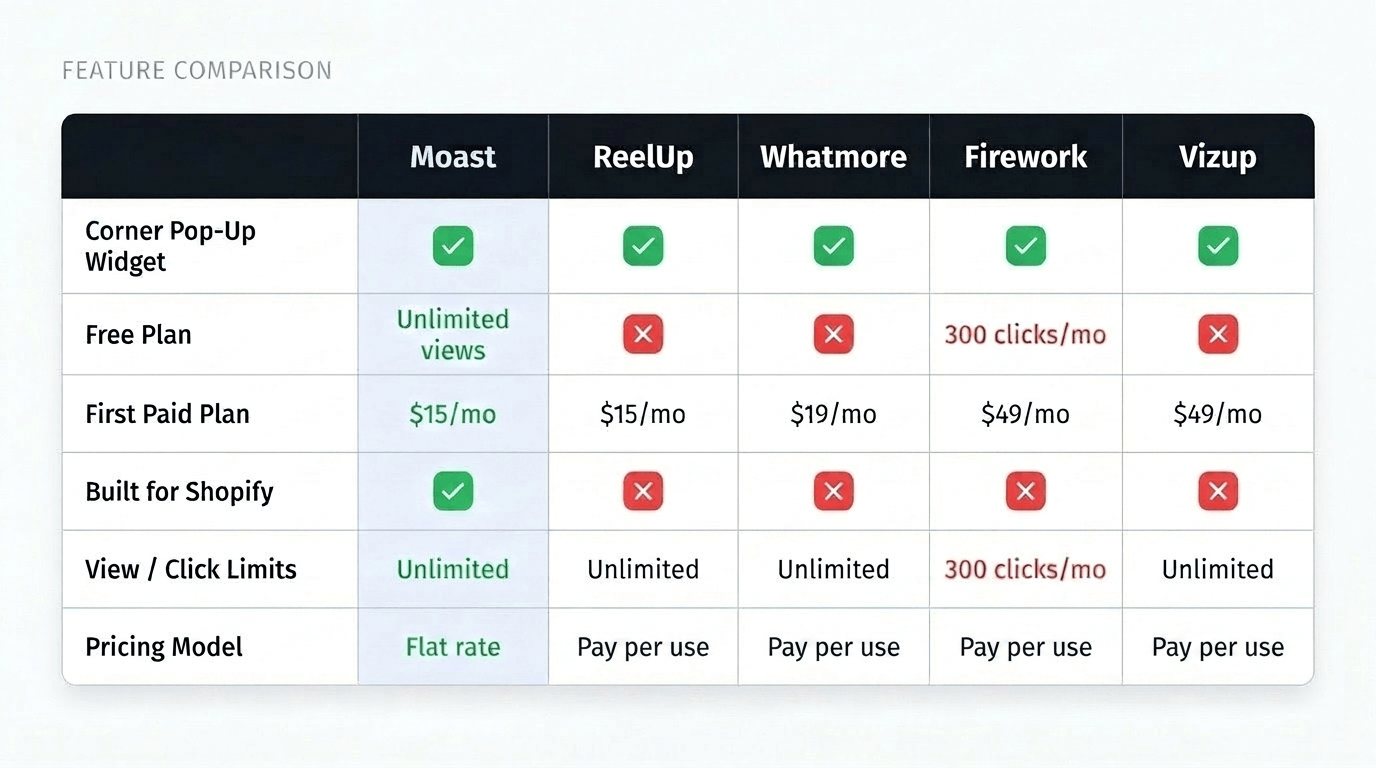
The free plan includes unlimited views and unlimited uploads, making it the only app in this list where you can deploy corner pop-up shoppable video at meaningful scale without paying anything. The paid plan is $15/month flat with unlimited views — no impression fees, no usage charges, no surprises when your videos start performing well.
Where Moast stands out beyond the floating widget is the full ecosystem it provides: TikTok and Instagram import by URL, Social Sync for automatic content updates, Moast Collect for customer video submissions, and analytics that show revenue attribution at the video level.
Best for: Shopify merchants who want corner pop-up video as part of a full shoppable video strategy, with the best free plan in the category and no usage-based pricing.
Pricing: Free (unlimited views) · $15/month paid plan | Built for Shopify: Certified
2. ReelUp — Strong option with a clean floating widget
ReelUp is a Built for Shopify certified app that offers shoppable video in several formats including a stories widget, carousel, and floating video pop-up. The app is well-regarded for its clean implementation and page speed — it specifically advertises zero impact on page loading speed.
ReelUp supports TikTok and Instagram import, product tagging, and per-video analytics. The floating widget is smooth and mobile-responsive. The main consideration: ReelUp's free plan is limited to 100 video views per month — fine for testing but not enough for any store with real traffic. Their first paid plan starts at $39.99/month.
Best for: Merchants who want a polished, Built for Shopify certified option and are comfortable with the higher entry-level price.
Pricing: Free (100 views/month) · $39.99/month first paid plan | Built for Shopify: Certified
3. Whatmore — Feature-rich with a floating widget included
Whatmore offers shoppable video in 10+ formats including a floating widget alongside carousels, stories, banners, and gallery grids. It's the most feature-dense option on this list — with Meta Pixel retargeting, A/B testing, and smart retargeting built in.
The tradeoff is complexity and pricing model. Whatmore charges based on video clicks rather than views — on the free plan you get 300 clicks per month, on the first paid plan ($29/month) you get 3,000 clicks. For stores with high-engagement video content, this model can get expensive quickly. Whatmore also does not hold the Built for Shopify badge.
Best for: Merchants who want enterprise features like retargeting and A/B testing alongside floating video, and are willing to manage click-based usage limits.
Pricing: Free (300 clicks/month) · $29/month first paid plan | Built for Shopify: Not certified
4. Firework — Powerful but enterprise-priced
Firework is a comprehensive video commerce platform that includes floating video bubbles, shoppable stories, carousels, and live shopping features. The floating widget implementation is well-built and the product is mature — Firework has been in the category since 2022.
For most growing Shopify brands, the challenge is pricing. Their free plan caps at 1,000 video views per month and only 10 uploads. The first paid plan is $39/month for 10,000 views, then $5 per additional 1,000 views. Firework does hold the Built for Shopify badge and has strong analytics. It's a better fit for larger brands that need live shopping and want all video formats in one platform.
Best for: Larger Shopify brands who need live shopping alongside floating video and are comfortable with view-based pricing at scale.
Pricing: Free (1,000 views/month) · $39/month first paid plan | Built for Shopify: Certified
5. Vizup — Budget option with floating video support
Vizup is a lighter-weight shoppable video app that includes a floating pop-up video format alongside carousels and grid layouts. It supports TikTok and Instagram import, product tagging, and basic analytics. For merchants on a tight budget who primarily want a simple floating video widget without a complex broader feature set, Vizup is worth considering.
The app is less polished than the options above and the analytics are more basic, but the core floating widget functionality works. It does not hold the Built for Shopify badge.
Best for: Budget-conscious merchants who want a basic floating video widget with minimal setup complexity.
Pricing: Free plan available · Paid plans from $9.99/month | Built for Shopify: Not certified
How to Get the Most Out of a Corner Pop-Up Video Widget
Once you've chosen an app and installed the floating widget, here's how to maximise its impact:
- Choose one strong video for the floating bubble. Unlike a carousel where multiple videos are available to browse, the corner pop-up typically features one video at a time — make it count. Your best-performing customer testimonial, a compelling product demo, or a creator video that shows your product in real use is the right choice.
- Tag your product before publishing. Every floating video should have a product tag. A floating bubble that plays video but doesn't give shoppers a way to buy is a missed opportunity. In Moast, you can add product tags in the video editor before the widget goes live.
- Position it away from your add-to-cart button on mobile. The most common mistake with floating widgets on mobile is placing the bubble in a position that covers the add-to-cart button on product pages. Test on mobile before publishing.
- Use it on long product pages specifically. The floating widget earns its value most on pages with significant scroll depth. On a short PDP, a well-placed carousel or stories widget above the reviews section will outperform the floating bubble.
- Rotate the video occasionally. If you have returning visitors, the same floating bubble video gets ignored after they've seen it a few times. Refresh it quarterly with new content. Social Sync in Moast can automate content updates from Instagram and TikTok.
- Measure separately from your other widgets. Your analytics should show floating widget performance independently from your carousel or stories placements. According to data on shoppable video conversion rates, the placement and format of video on a product page affects results significantly — measurement lets you optimise the right levers.
Frequently Asked Questions
What is a corner pop-up shoppable video on Shopify?
A corner pop-up shoppable video — also called a floating video bubble or floating widget — is a persistent, fixed-position video element that sits in the corner of the screen and follows shoppers as they scroll. When tapped or clicked, it expands into a video experience with shoppable product tags. It stays accessible throughout the entire page browsing session, unlike a mid-page carousel that's only visible at one scroll depth.
Which Shopify app has the best corner pop-up shoppable video?
Moast is the top option for most Shopify merchants — it offers a floating video bubble widget with unlimited views on the free plan, product tagging, TikTok and Instagram import, and has the Built for Shopify certification. It costs $15/month on the paid plan, which is the most competitive pricing in the category for unlimited views.
Does a floating video widget slow down my Shopify store?
It depends on the app. A poorly optimised floating widget loads on every page and can meaningfully impact your Core Web Vitals and conversion rates. Well-engineered apps use lazy loading so the widget doesn't affect initial page load. Moast's total page load impact is 0.85MB — essentially zero measurable effect on page speed. Always run a Google PageSpeed Insights test before and after adding any video widget.
Should I use a corner pop-up or a stories widget on my product pages?
Both, ideally. A stories widget or carousel placed above the reviews section on your PDPs is the highest-converting placement for purchase-intent moments. A corner pop-up floating widget gives shoppers access to video throughout the rest of the page. They serve different purposes and complement each other on long product pages.
Can I tag products in a floating video bubble?
Yes, with most good shoppable video apps. Product tags embedded in the floating video allow shoppers to click directly from the video to a product page or add to cart. Every floating video widget should have at least one product tag — a widget without tags is content, not a conversion tool.
How many videos should I show in a corner pop-up widget?
Typically one strong video per floating bubble, chosen for maximum relevance to the page it's on. Unlike a carousel, the floating widget isn't designed for browsing multiple videos — it's a persistent invitation to watch one compelling piece of content. Choose your best customer testimonial or product demo for the floating position.
The corner pop-up shoppable video format is underused compared to carousels and stories widgets — and that's precisely why it represents a relatively easy win for merchants willing to add it. It doesn't require rearranging your page layout, it follows shoppers throughout their entire browsing session, and it works in the background until a shopper is ready to engage.
Start with your highest-traffic product page, install a floating bubble with a single strong tagged testimonial video, and measure the impact over four weeks. The results often surprise merchants who assumed customers weren't watching.
Get started with Moast for free
Related reading: How to increase Shopify PDP revenue with shoppable video · Best shoppable video apps for Shopify in 2025 · Does shoppable video actually increase conversions?
Related content
.jpg)
.jpg)

Turn your social content into a revenue channel
Turn your TikToks and Reels into shoppable videos and boost conversions by 3.5x.