
- Know where your conversion rate actually stands
- Why video lifts conversion where other tactics stall
- Tactic 1: Put shoppable customer video above your reviews
- Tactic 2: Use video testimonials to kill specific objections
- Tactic 3: Replace static explanations with demonstration video
- Tactic 4: Go vertical-first to close the mobile gap
- Tactic 5: Tag every product in every video
- Tactic 6: Deploy video at your recovery points
- Measure the lift properly
- What the lift looks like in practice
- Ship your first conversion lift this week
- Frequently asked questions
The average Shopify store converts around 1.4% of visitors. The top 10% convert above 4.7%. Video is one of the few levers that reliably moves a store from the first group toward the second, and this guide covers exactly how to use it.

Know Where Your Conversion Rate Actually Stands
Before optimising anything, anchor yourself to real numbers. According to Littledata's Shopify benchmarks via Blend Commerce, the average Shopify conversion rate is 1.4%, stores above 3.2% sit in the top 20%, and stores above 4.7% are in the top 10%. The average add-to-cart rate is 4.6%, and Baymard Institute puts average cart abandonment at just over 70%.
Two details in that data matter for video specifically. First, mobile converts meaningfully worse than desktop across the platform, roughly 1.2 to 1.3% against 1.8 to 1.9% according to Propel Commerce's 2026 conversion analysis, even though mobile carries most traffic. Second, most lost conversions die on the product page, before the cart ever gets involved. Video attacks both of those weak points directly, which is why it consistently shows up in the playbooks of stores converting at the top-decile level.
Why Video Lifts Conversion Where Other Tactics Stall
Most conversion optimisation shaves friction: faster pages, cleaner checkout, fewer form fields. Necessary, but it does nothing about the actual reason most visitors leave without buying, which is unresolved doubt. Video resolves doubt through four mechanisms.
Trust transfer. A real customer on camera saying a product works is categorically more credible than the brand saying it. PowerReviews' research on consumer trust shows user-generated content is trusted far more than brand-produced content, and trust is the raw material conversion is made of.
Demonstration. Photos flatten the exact qualities that drive hesitation: fit, scale, texture, movement, quality. Thirty seconds of a product in real use answers questions a gallery of studio shots cannot.
Engagement. Shoppers spend roughly twice as long on product pages with video. More time engaged means more objections resolved and more of the range discovered before the leave-or-buy decision.
A native mobile format. Vertical video is the interface mobile shoppers already live in. Bringing it to the product page makes the weakest-converting device feel like the platforms where shoppers are most comfortable.
The six tactics below turn those mechanisms into placements. They are ordered by impact, so if you only do one thing, do the first.
Tactic 1: Put Shoppable Customer Video Above Your Reviews
The single highest-converting video placement on a Shopify store is a carousel of customer and creator video directly above the reviews section on product pages. That position catches shoppers at the exact moment they are hunting for social proof, and gives them a richer version of it than written reviews alone.
The word shoppable is doing real work here. Every video needs product tags, so the shopper who is convinced mid-video can tap through to add to cart without scrolling away. An untagged video creates a feeling; a tagged video creates a purchase path. Cradlewise, a smart crib brand, lifted conversion 17% by showcasing real customer content on their store, and Dame added $26,000 in monthly revenue from the same placement discipline.
The mechanics of widget choice and positioning are covered in our guide to increasing Shopify PDP revenue with shoppable video.
Tactic 2: Use Video Testimonials to Kill Specific Objections
Every product has two or three objections that cause most of its lost conversions: does it fit true to size, is it worth the premium, will it work for my situation. Generic praise does not touch these. A testimonial where a real customer addresses the objection directly does.
Audit your worst-converting high-traffic product pages and identify the dominant objection for each, from support tickets, review themes, and size-guide clicks. Then source or request testimonial content that answers it specifically. A customer saying I am usually between sizes and the medium fit perfectly converts more fence-sitters than five stars ever will.
For sourcing that content systematically, see how to collect customer video testimonials without asking twice, and for where testimonials sit in the broader trust stack, our complete guide to Shopify social proof.
Tactic 3: Replace Static Explanations With Demonstration Video
For products with any complexity, setup, technique, or a claim that sounds too good to be true, demonstration video converts where descriptions cannot. Fellow, the premium coffee gear brand, rebuilt their product education as step-by-step video tours and cut support tickets and returns while giving hesitant buyers proof the product is manageable.
The conversion effect is confidence: a shopper who has watched someone assemble, use, and succeed with a product has already rehearsed owning it. This is doubly true for premium price points, where video makes quality tangible, the weight of a fabric, the machining of a part, in ways that justify the price a static page struggles to defend.

Tactic 4: Go Vertical-First to Close the Mobile Gap
Mobile is where the conversion gap lives, and the fix is format. A stories-style widget, tappable circles that expand to full-screen vertical video, mirrors the exact interaction pattern shoppers use on TikTok and Instagram all day. On mobile product pages it consistently outperforms embedded horizontal players, which shrink to postage stamps and interrupt the scroll.
Practical rules: keep clips under 60 seconds, design for sound-off viewing since most mobile shoppers browse muted, and let the first two seconds show the product rather than an intro card. The content itself should be native vertical footage, which is another reason imported TikToks and Reels outperform repurposed studio video. Importing them takes minutes; the walkthrough is in our guide to adding TikTok Reels to Shopify product pages.
Tactic 5: Tag Every Product in Every Video
Tagging is the difference between video that entertains and video that converts, and partial tagging quietly caps your upside. A creator clip showing a full routine or outfit should carry a tag for every visible item, not just the hero product of the page it sits on.
Complete tagging does two jobs. It shortens the path from interest to cart for the main product, and it turns every multi-product video into a discovery surface that lifts both conversion and basket size. The order-value half of that equation is covered in how to increase Shopify average order value with video.
Tactic 6: Deploy Video at Your Recovery Points
With cart abandonment above 70%, your recovery emails are a conversion surface as important as any page. A browse-abandonment email that includes the testimonial video for the exact product viewed re-opens the decision with your most persuasive asset instead of a plain reminder. The same applies to abandoned-cart sequences and win-back campaigns, where fresh customer video gives lapsed buyers a reason to return that a discount code alone does not.
The retention side of this playbook, post-purchase sequences, win-backs, and community content, is laid out in how to increase Shopify repeat purchase rate with video.
Measure the Lift Properly
Video's conversion impact should be measured at the page level, not the store level, because coverage rolls out page by page.
Conversion rate per page, before and after. Record each page's baseline for two weeks before adding video, then compare the same window after. Store-level averages dilute the signal while coverage is partial.
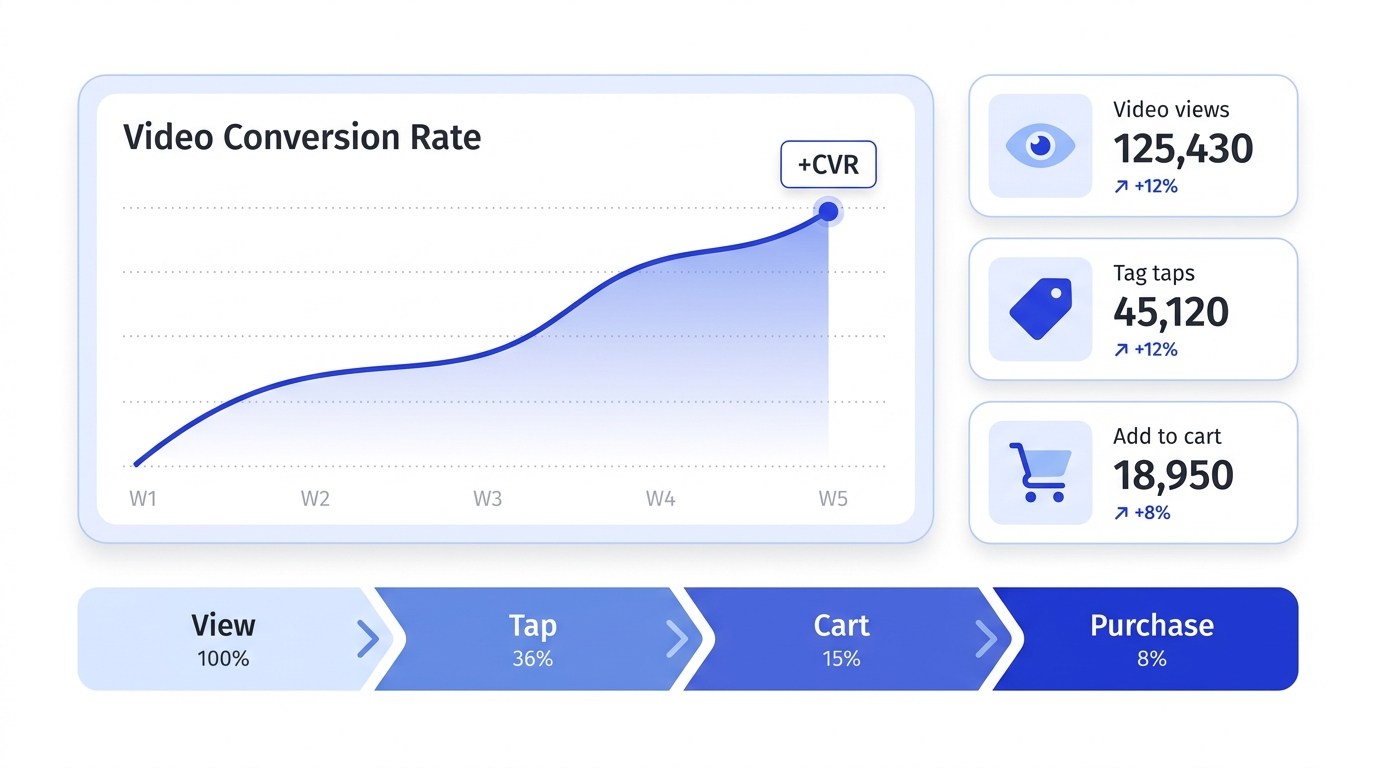
Add-to-cart rate on video-engaged sessions. The clearest causal signal: compare sessions where a shopper played a video or tapped a product tag against sessions where they did not.
Revenue per visitor. RPV captures conversion and order value in one number. Dame's $0.16 RPV lift is the benchmark for what a meaningful result looks like.
Attributed revenue per video. Tag-through revenue tells you which specific videos convert, so you know what content to make more of.
For turning these numbers into a business case, our guide to calculating the ROI of shoppable video walks through the full model.
What the Lift Looks Like in Practice
The pattern across brands that measure carefully is consistent: same traffic, meaningfully more revenue.
Dame added shoppable customer video to their product pages and gained $26,000 in monthly revenue and $0.16 in revenue per visitor with no traffic increase. ENDU moved monthly revenue from 307,000 to 345,000 euros on the same 100,000 visitors after adding shoppable video reviews. ThruDark generated $5,854 in directly attributable sales in the first 30 days of a shoppable carousel. Cradlewise lifted conversion 17% with real customer content on a high-consideration product.
Different categories, different price points, same mechanism: authentic video, tagged, placed where the decision happens. More breakdowns are in shoppable video examples: 10 Shopify brands doing it right.
Ship Your First Conversion Lift This Week
The sequence that gets from zero to measurable in seven days:
Day 1: Pick your three highest-traffic product pages and note each one's current conversion rate.
Day 2: Gather five to eight existing clips per page: customer TikToks, Reels, unboxings, demos. Import them by URL rather than re-shooting; the steps are in our guide to adding shoppable video to Shopify.
Day 3: Tag every visible product in every clip, then place a stories or carousel widget above the reviews section on those three pages.
Days 4 to 7: Let it run. Then read the page-level numbers, keep what converts, replace what does not, and expand to the next tier of pages.
Where this fits in the bigger picture, content acquisition, deployment, distribution, and measurement, is mapped in our guide to building a video commerce strategy for Shopify.
Frequently Asked Questions
What is a good conversion rate for a Shopify store?
The platform average is around 1.4%. Above 2% is solid, above 3.2% puts you in the top 20% of Shopify stores, and above 4.7% is top 10%, per Littledata's benchmark data. The more useful comparison is your own page-level trend, because industry, price point, and traffic mix move the baseline significantly.
How much can video increase Shopify conversion rate?
Documented results include a 17% conversion lift at Cradlewise, a $26,000 monthly revenue increase at Dame, and a 38,000 euro monthly increase at ENDU, all with unchanged traffic. Your result depends on placement and tagging: video above the reviews section with complete product tags is where the measurable lifts come from.
What type of video converts best on Shopify?
Authentic customer and creator video consistently outperforms polished brand production, because trust is the mechanism doing the converting. Short vertical clips under 60 seconds, showing real people using the product in real conditions, with every visible product tagged, are the highest-converting format.
Where should video go on a Shopify product page?
Directly above the reviews section, where shoppers actively look for social proof before deciding. A stories-style widget works best on mobile, a carousel works well on desktop, and both should sit on your highest-traffic pages first so the lift is measurable quickly.
Does video slow down a Shopify store and hurt conversion?
A badly built video app can, which is why widget performance matters as much as content. Prefer apps carrying the Built for Shopify badge, which requires meeting Shopify's performance standards, and check your product page speed before and after installing. A well-built widget loads asynchronously and has no meaningful effect on page speed.
Get started with Moast for free
Related reading: Shoppable video examples: 10 Shopify brands doing it right · How to increase Shopify PDP revenue with shoppable video · How to build a video commerce strategy for Shopify
October 12, 2026
Related content
.jpg)
.jpg)
.jpg)
Turn your social content into a revenue channel
Turn your TikToks and Reels into shoppable videos and boost conversions by 3.5x.