


- What Is a Video Carousel on a Shopify Product Page?
- Why Video Carousels Are Becoming Essential for Shopify Stores
- How a Video Carousel Improves Conversion Rates
- Types of Videos You Can Use in a Product Page Carousel
- Where to Place a Video Carousel for Maximum Impact
- How to Add a Video Carousel to Your Shopify Product Pages (Step-by-Step)
- Best Practices for Designing a High-Converting Video Carousel
- Common Mistakes to Avoid With Video Carousels
- How to Measure the Performance of Your Video Carousel
- Final Thoughts: Turning Product Pages Into Video-Driven Sales Engines
Most Shopify product pages still look the same.
A few static images. Maybe a short description. A price. A buy button.
But shoppers don’t buy the way they used to. They don’t rely on product photos alone. They want to see items in motion. They want to watch how something fits, how it moves, how it works, and how real people use it.
That’s where the video carousel comes in.
A video carousel turns your product page into a dynamic, interactive experience. Instead of just scrolling through images, shoppers can swipe through videos, watch real usage, and get a better sense of the product before they commit to buying.
For Shopify merchants, adding a video carousel is one of the simplest ways to improve engagement and increase conversions. It brings your product pages closer to how people actually shop today—through video.
This guide walks you through exactly what a video carousel is, why it matters, and how to add one to your Shopify product pages step by step.
What Is a Video Carousel on a Shopify Product Page?
A video carousel is a horizontally scrollable row of videos that appears directly on a product page. Instead of relying only on static images, it allows shoppers to swipe or click through multiple video clips without leaving the page.
In a traditional Shopify product gallery, customers usually see a series of photos. They might scroll through close-ups, lifestyle shots, and different angles of the product. A video carousel builds on that idea, but replaces or complements those images with motion-based content.
This means shoppers can watch:
- short product demonstrations
- customer testimonials
- styling or usage clips
- unboxings
- quick tutorials
- real-life scenarios featuring the product
All of these videos sit inside a single, swipeable section, making the experience feel interactive and modern.
From a design perspective, a video carousel looks similar to an image slider. The difference is that each tile or thumbnail represents a playable video instead of a photo. When a shopper taps or clicks on one, the video plays instantly within the page.

This creates a much richer product experience. Instead of imagining how something works, shoppers can see it in action. They can watch the fabric move, the mechanism operate, or the product being used in a real environment.
For example, a clothing brand might use a video carousel to show:
- a model walking in the garment
- a close-up of the fabric texture
- a quick “3 ways to style this” clip
- a customer talking about the fit
A kitchenware brand might include:
- a quick cooking demonstration
- a cleaning or maintenance clip
- a comparison with other tools
- a short testimonial from a home chef
These videos help answer common questions before the shopper even asks them.
Another important aspect of a video carousel is how it fits into the overall shopping flow. It usually appears near the top of the product page, close to the main image gallery or directly underneath it. This placement ensures that shoppers encounter the videos early in their decision-making process.
Because the videos are grouped together in a carousel, the page stays clean and organized. Instead of stacking multiple videos vertically and pushing important content further down, the carousel keeps everything compact and easy to browse.
From the shopper’s point of view, it feels natural. They simply swipe or click through the videos the same way they would scroll through photos on a phone.
This familiarity matters. Modern consumers are used to swipeable video experiences from social platforms. A video carousel brings that same interaction style directly into your Shopify store.
At a deeper level, a video carousel is about reducing uncertainty. Online shoppers can’t touch or test products the way they would in a physical store. Video helps bridge that gap. It provides movement, context, and authenticity that static images can’t always deliver.
When used well, a video carousel transforms a product page from a simple catalog entry into a more immersive experience. It helps shoppers feel like they truly understand the product before buying, which often leads to stronger confidence and higher conversion rates.
In short, a video carousel is not just a design element. It’s a conversion tool. It brings motion, storytelling, and social proof into one compact section of your product page, helping shoppers move from curiosity to purchase with less hesitation.
Why Video Carousels Are Becoming Essential for Shopify Stores
Ecommerce is shifting toward video-first experiences.
Shoppers today discover products on platforms like TikTok, Instagram, and YouTube, where nearly every piece of content is short-form video. By the time someone clicks through to your Shopify store, they’ve already spent time watching creators demonstrate products, share reviews, or show real-life use cases.
If your product page only shows static images, it can feel like a step backward. The energy and context of video suddenly disappear, and the shopping experience becomes more passive.
A video carousel helps bridge that gap.
It creates continuity between the discovery experience and the purchase experience. Instead of forcing shoppers to switch from fast, engaging video content to a static gallery, you keep them in the same interactive environment. The transition from social platform to product page feels natural instead of jarring.
This matters because modern shoppers are more visual and more impatient. They want quick answers to questions like:
- How does this look in real life?
- How does it move or fit?
- What does it actually do?
- Do other people like it?
Video answers these questions instantly. A short clip can communicate sizing, texture, functionality, or results far faster than paragraphs of text or a series of photos.
Video carousels also align with how people browse on mobile. Most ecommerce traffic now comes from phones, where swipeable content feels intuitive. A horizontal video carousel mirrors the interaction patterns people already use on social apps, making the experience feel familiar and easy to navigate.
As competition between Shopify stores increases, small improvements in the shopping experience can make a big difference. Two stores might sell similar products at similar prices, but the one with a dynamic, video-rich product page will often feel more trustworthy and engaging.
This leads to:
- longer time spent on product pages
- stronger emotional connection to the product
- increased trust through real-life demonstrations
- higher likelihood of completing a purchase
In many ways, video carousels are becoming the new standard for modern ecommerce design. They reflect how people actually shop today and help product pages feel more alive, interactive, and persuasive.
How a Video Carousel Improves Conversion Rates
At its core, a video carousel reduces uncertainty.
Most online shoppers hesitate because they’re not sure what they’ll receive. They can’t touch the product. They can’t try it on. They can’t test how it works.
Video solves that problem.
It shows:
- scale and proportions
- movement and flexibility
- real-world use
- texture and materials
- actual results
When shoppers feel more confident, they buy faster.
Video carousels also create a sense of social proof, especially when they include customer content. Seeing real people use and enjoy a product builds trust in a way studio photos cannot.
There’s also a psychological effect. Movement naturally draws the eye. A video carousel makes the page feel more alive and interactive, which keeps shoppers engaged longer.
More engagement typically leads to higher conversion rates.
Types of Videos You Can Use in a Product Page Carousel
Not all videos are created equal. Some formats perform better than others on product pages.
Here are the most effective types to include in a video carousel.
Product demos
Short clips showing how the product works. These help answer practical questions quickly.
Customer testimonials
Real customers talking about their experience. These build trust and credibility.
Lifestyle clips
Footage of the product being used in real-life situations. This helps shoppers imagine owning it.
Tutorials or how-to videos
Quick guides that show the product in action. These are especially useful for technical or multi-use products.
Creator or UGC-style content
Short, authentic videos made by influencers or customers. These tend to feel more relatable and less like ads.
A strong video carousel usually includes a mix of these formats.
Where to Place a Video Carousel for Maximum Impact
Placement matters just as much as the videos themselves.
Even the best video carousel won’t help conversions if shoppers never see it. If it’s buried near the bottom of the page, many visitors will make their decision before they ever scroll far enough to find it.
Your goal is to position the carousel where it naturally fits into the shopper’s decision-making flow.
The most effective placements are:
Near the main product gallery
This is usually the highest-impact location. Shoppers instinctively look at the main gallery first to understand what the product looks like. Placing the video carousel here lets them immediately move from static images to dynamic, real-life demonstrations. It keeps their attention in the same visual area and encourages interaction.
Directly under the product description
If your main gallery is image-focused or tightly designed, placing the video carousel just below the description works well. By this point, shoppers have seen the product and read key details. The videos then act as reinforcement, answering remaining questions and building confidence.
Above customer reviews
This is another strong placement because it pairs visual proof with written proof. Shoppers often scroll to reviews when they’re close to making a decision. Placing the video carousel right above that section allows them to watch real-life product usage before reading customer feedback.
When choosing placement, think about how someone scans your product page for the first time. Most visitors follow a simple pattern:
- Look at the product images
- Check the price and variants
- Read a short portion of the description
- Scroll for reassurance (reviews, details, proof)
Your video carousel should appear somewhere along this path, not outside of it.
The key principle is visibility without disruption. The carousel should feel like a natural extension of the product experience, not an afterthought or an intrusive element. When placed correctly, it becomes a helpful decision-making tool that shoppers encounter exactly when they need it.
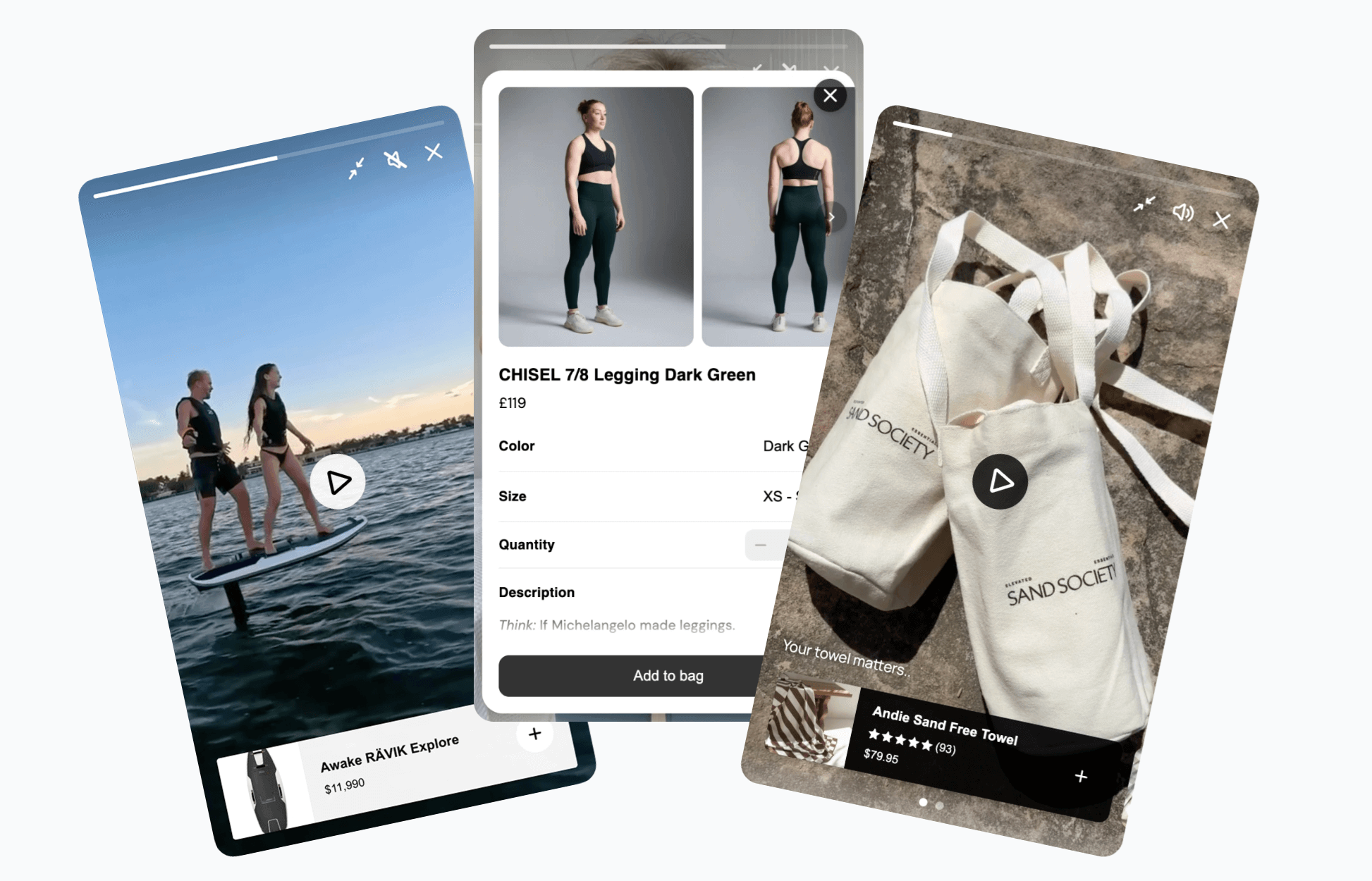
Here’s a rewritten version of that section using Moast as the setup method. It keeps the tone and structure consistent with the rest of the article while making the steps practical and product-specific.
How to Add a Video Carousel to Your Shopify Product Pages (Step-by-Step)
One of the fastest ways to add a video carousel to your Shopify store is by using a dedicated shoppable video app like Moast. This approach avoids custom development and lets you launch a carousel in minutes.
Here’s what the process typically looks like.
Step 1: Install the Moast app
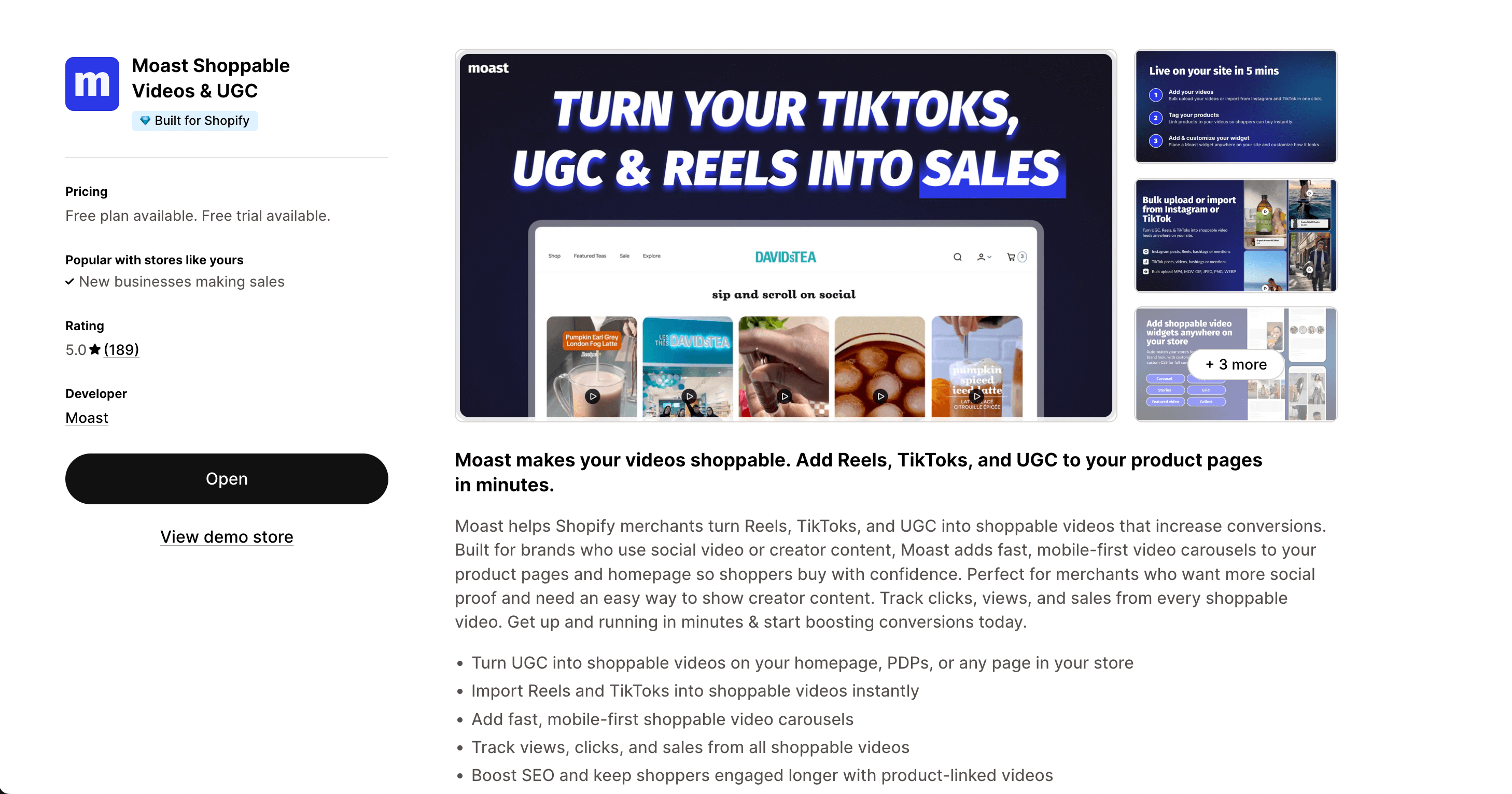
Go to the Shopify App Store and install Moast. Once installed, the app will guide you through a short onboarding process to connect your store and enable video features.
Step 2: Import or collect your videos
Inside the Moast dashboard, you can add videos in a few different ways:
- upload your own product demos
- import content from social media
- collect videos from customers
- add creator or influencer clips
All of these videos will live in your Moast media library.
Step 3: Assign videos to the correct products
Next, link each video to the relevant product. This ensures the right videos appear on the right product pages.
You can:
- tag products directly inside each video
- assign multiple videos to the same product
- create collections of videos for different items
This step turns your videos into product-specific content instead of a generic gallery.
Step 4: Create your video carousel widget
Inside Moast, you’ll create a widget for your product pages. Choose a carousel-style layout designed for PDPs.
At this stage, you can customize:
- carousel style and layout
- number of videos displayed
- thumbnail appearance
- autoplay or click-to-play behavior
The goal is to match your store’s design while keeping the carousel clean and easy to use.
Step 5: Place the carousel on your product pages
Moast provides simple placement options that don’t require coding. You can typically:
- add the carousel directly to your product page template
- insert it near the image gallery
- place it below the product description
Most themes support quick placement through the theme editor.

Step 6: Preview on desktop and mobile
Before going live, check how the carousel looks on different devices. Make sure:
- videos load quickly
- the carousel is easy to swipe on mobile
- the layout fits naturally into your product page
Small adjustments here can improve engagement.
Step 7: Publish and start tracking results
Once everything looks right, publish the carousel. Your product pages will now display interactive video content.
From there, you can monitor:
- video views
- clicks on products
- conversion impact
You can continue adding new videos over time, turning your carousel into a growing library of social proof and product demonstrations.
With this setup, your product pages move beyond static images and start delivering a more interactive, video-driven shopping experience.
Best Practices for Designing a High-Converting Video Carousel
A video carousel should be simple, fast, and focused on the product.
Here are some proven guidelines.
Keep videos short. Aim for 5–20 seconds whenever possible. Quick clips perform better on product pages.
Lead with the most important video. The first clip should show the product clearly.
Use real people. Human presence builds trust.
Avoid overloading the carousel. Five to eight strong videos are better than twenty mediocre ones.
Make sure the first frame is clear. The thumbnail should instantly communicate what the video shows.
Test autoplay carefully. It can increase engagement, but it shouldn’t feel intrusive.
Keep loading speed in mind. Heavy video files can slow down your page and hurt conversions.
A well-designed video carousel should feel natural, not overwhelming.
Common Mistakes to Avoid With Video Carousels
Many merchants add video but don’t see results because of simple mistakes.
One common issue is using videos that are too long. Product page videos should be quick and to the point.
Another mistake is hiding the carousel too far down the page. If shoppers don’t see it, it can’t help conversions.
Some stores use overly polished, ad-like videos. These often feel less authentic than casual, real-life clips.
Others ignore mobile optimization. Since most traffic comes from phones, the carousel must work perfectly on small screens.
Finally, some merchants forget to update their videos. A stale carousel can hurt trust.
Keeping content fresh and relevant makes a big difference.
How to Measure the Performance of Your Video Carousel
Once your video carousel is live, you’ll want to track its impact.
Start with engagement metrics.
Look at:
- video views
- click-through rates
- time on page
If shoppers are interacting with your videos, that’s a good sign.
Next, compare conversion rates before and after adding the carousel. Even a small lift can translate into significant revenue over time.
You can also track:
- add-to-cart rates
- average order value
- bounce rates
If your video carousel is working, you’ll usually see improvements in at least one of these areas.
Over time, analyze which videos perform best. Replace underperforming clips with new ones.
Treat your video carousel as a living part of your store, not a one-time setup.
Final Thoughts: Turning Product Pages Into Video-Driven Sales Engines
Static product pages are slowly becoming outdated.
Shoppers expect movement, authenticity, and real-life context. They want to see products in action before they buy.
A video carousel helps meet those expectations.
It adds energy to your product pages. It reduces uncertainty. It builds trust. And it gives shoppers the confidence to click the buy button.
Best of all, adding a video carousel is one of the simplest upgrades you can make to your Shopify store. It doesn’t require a full redesign or complex development.
Just a few strong videos, placed in the right spot, can transform the entire shopping experience.
If you’re looking for a practical way to improve conversions, a video carousel is a great place to start.
October 12, 2026
Related content
.jpg)
.jpg)
.jpg)
Turn your social content into a revenue channel
Turn your TikToks and Reels into shoppable videos and boost conversions by 3.5x.