


- Why Video Testimonials Are Worth the Effort to Collect
- Why Most Collection Attempts Fail
- The Timing Problem: When to Ask
- The Friction Problem: How to Ask
- The Incentive Problem: Why Should They Bother
- Step 1: Set Up Your Collection Infrastructure
- Step 2: Build Your Post-Purchase Email Sequence
- Step 3: Make Submission Effortless
- Step 4: Create a Dedicated Collection Landing Page
- Step 5: Automate New Submissions Into Your Store
- Step 6: Tap the Content You Didn't Know You Had
- How Real Brands Built Self-Updating Video Libraries
- What to Do With Video Once You Have It
- Frequently Asked Questions
Most brands ask for video testimonials the wrong way, at the wrong time, with no reason for the customer to bother. Here's the system that actually works.
Why Video Testimonials Are Worth the Effort to Collect
Before getting into the how, it's worth being precise about why video testimonials are worth building a system around in the first place.
Written reviews are useful. Star ratings provide a quick trust signal. But video testimonials occupy a different category entirely — one that's demonstrably more effective at converting browsers into buyers.
Including video testimonials on a product page can increase conversion rate by up to 80%. Shoppers who watch a real customer describe their experience are more likely to buy because they're getting something no product description or written review can provide: tone, body language, genuine reaction, and the unscripted quality that signals authenticity.
Research from PowerReviews shows UGC is 9x more trusted than brand-produced content. For high-consideration purchases — a stroller, a premium appliance, a skincare routine, a piece of equipment — seeing a real person who has already committed and lived with the product is the most powerful reassurance available.
The other reason video testimonials are worth building a collection system around: they compound. A written review strategy means new reviews arrive passively, unpredictably. A video testimonial collection system — one with a structured ask, the right timing, and a low-friction submission path — generates content continuously and predictably. The library grows every month, your product pages get stronger, and the whole thing becomes self-sustaining over time.

Why Most Collection Attempts Fail
Most brands who try to collect video testimonials give up after a few weeks. Not because their customers don't have good things to say — they do — but because the collection approach was wrong in three specific ways.
- Wrong timing. Asking for a video testimonial immediately after purchase, before the customer has used the product, is like asking someone to review a restaurant before they've eaten. They have nothing to say yet, and the request feels premature. The email goes ignored.
- Too much friction. Asking a customer to record a video, edit it, export it, and email it back — or even just navigate to a complicated upload portal on a desktop device — loses most people before they start. Every step added to the submission process costs you a significant percentage of potential responses.
- No reason to bother. "We'd love to hear your story!" is not a compelling incentive. A customer who had a genuinely positive experience might want to share it — but that motivation fades fast when there's nothing tangible in it for them, and when the submission process requires effort.
The fix for all three is systematic: the right timing, the lowest possible friction, and a meaningful incentive. Each element compounds the others — the best incentive in the world doesn't help if the timing is wrong.
The Timing Problem: When to Ask
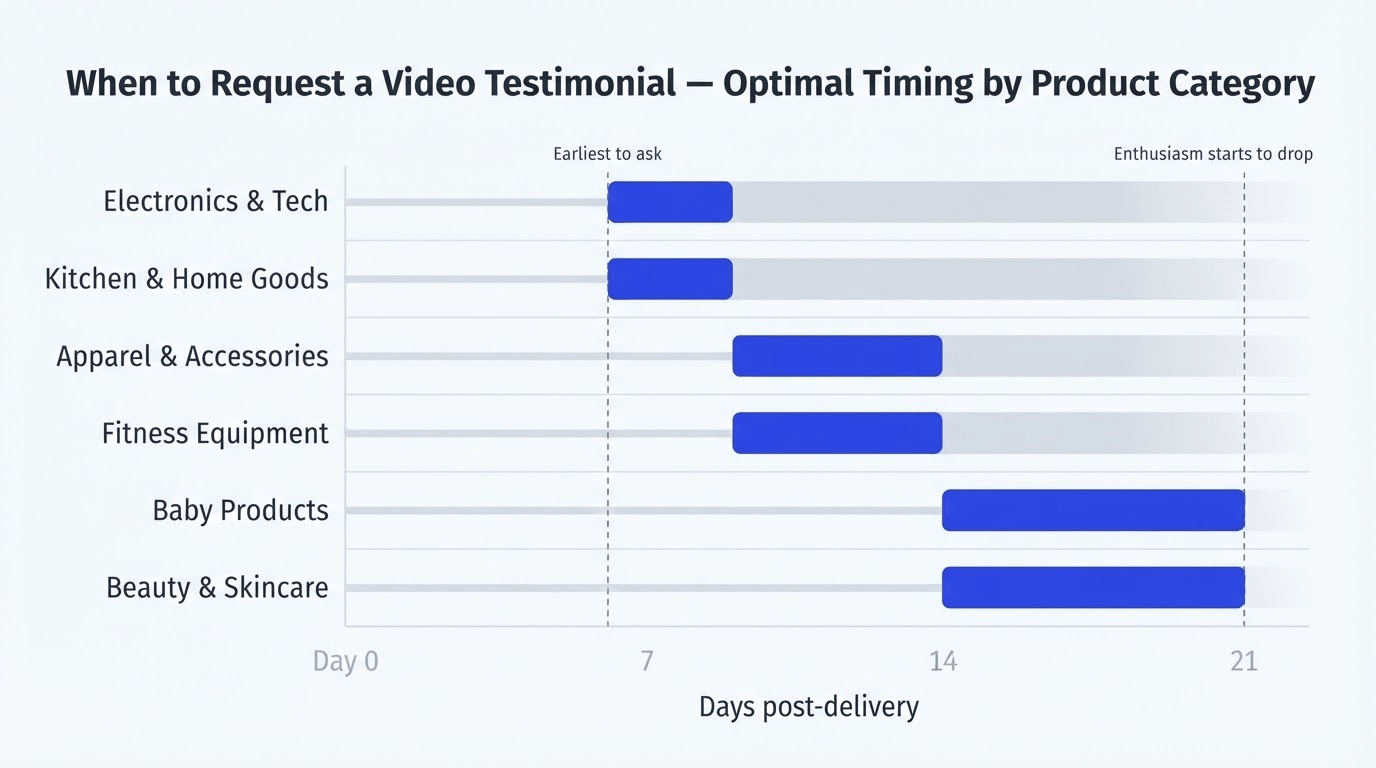
The optimal moment to ask for a video testimonial is after a customer has used the product enough to have a genuine opinion about it — but before the novelty has worn off enough that their enthusiasm has faded.
That window varies by product category, but a few principles hold consistently:
- Wait until after first use, not after delivery. For most physical products, this means 7–14 days post-delivery rather than immediately after purchase. A customer who has just received a package doesn't have a story to tell yet.
- Align timing to the product's value realisation point. This is the moment when a customer first experiences the core benefit they purchased the product for. Build your ask timing around that moment — not around your shipping schedule.
- Strike while enthusiasm is high. A customer three months into owning your product has normalised it into their routine and is significantly less likely to describe it enthusiastically on camera than a customer who used it for the first time two weeks ago.
Practical timing by category:
- Apparel and accessories: 10–14 days post-delivery (after they've worn it)
- Beauty and skincare: 14–21 days (after they can see early results)
- Kitchen and home goods: 7–10 days (after a few uses)
- Fitness equipment: 10–14 days (after several workouts)
- Baby products: 14–21 days (after the initial adjustment period)
- Electronics and tech: 7–10 days (after setup and first real use)
The Friction Problem: How to Ask
The way you ask matters as much as when you ask. High-friction requests get ignored. Low-friction requests get responses.
The highest-friction version of a video testimonial ask: "Please record a video of yourself reviewing our product, edit it so it's under 60 seconds, and email it as an attachment." Almost no one does this. Not because they don't want to help — because the effort required exceeds what they're willing to give, even when they love the product.
The lowest-friction version: a single link in an email that opens directly to a camera-ready upload page, where they tap record, say what they want to say, and submit — on mobile, in under 2 minutes.
The principles of low-friction collection:
- Mobile-first above all else. The majority of your customers will see your collection request on their phone and are most likely to record and submit a video on that same phone. A collection flow that requires a desktop computer loses a large portion of your potential submissions.
- One link, direct to submission. Don't send customers to your homepage and ask them to find the reviews page. One link, one action, one submit button.
- Give them a prompt. A blank camera with instructions to "say what you think about the product" is more intimidating than it sounds. Give customers 2–3 specific questions to answer. A structured prompt makes recording easier and produces more useful content.
- Tell them what you'll do with it. Customers who know their video will appear on a product page alongside their name are more motivated to present it well.
The Incentive Problem: Why Should They Bother
An enthusiastic customer might record a video for you with no incentive at all. Most customers — even satisfied ones — won't. Not because they don't appreciate your brand, but because recording a video requires meaningful effort, and without a tangible reason to invest that effort, the moment passes.
The incentives that work, ranked by effectiveness:
- Discount on next purchase (most universally effective). Offering 10–15% off a future order in exchange for a submitted video works across almost every product category. It's simple, immediate, and gives customers a concrete reason to act. Below 10% and the perceived value isn't enough to motivate action; above 20% and you're spending margin you don't need to.
- Free product or gift with next order. For brands with a strong product range, offering a free sample or a low-cost product with next purchase is often more motivating than a discount, because it feels more tangible and exciting.
- Early access to new products or collections. For brands with engaged repeat customers, offering exclusive early access to new drops or collections is a meaningful incentive that doesn't cost margin.
- Ambassador status and community recognition. For brands in categories with passionate communities — outdoor gear, fitness, baby products — being featured as a brand ambassador is genuinely motivating. Mockingbird converted 140+ parents into ambassadors this way. Vibe Kayaks built a community of 80+ active contributors.
- Creator credits and social profile links. For customers with social audiences of their own, offering to display their profile name and a link to their social account alongside their video is a meaningful incentive — it gives them exposure in exchange for content.
The honest rule on incentives: match the incentive to the effort required and the product price point. A 10% discount on a $20 product is $2 — that's not motivating. On a $200 product it's $20, which is. Calibrate accordingly.

Step 1: Set Up Your Collection Infrastructure
Before sending a single email, you need the infrastructure in place to receive and manage submissions. Trying to collect video testimonials without a proper collection system means content arrives in a disorganised way, gets lost, or requires manual work to process.
What you need:
- A video collection widget — a tool that lets customers submit video directly from your store on mobile. Moast Collect does this with an embeddable widget you add to any page. Customers tap to record or upload, add their name and optional social handle, and submit. Videos land in a moderation queue for review before going live.
- A product tagging workflow — once a video is submitted, it needs to be tagged with the relevant product so it can be placed on the right product page. In Moast, tagging happens during the review step before a video goes live.
- A moderation queue — all submitted content should land in a review queue rather than going live automatically. You want to catch anything that doesn't meet your quality bar or brand standards before it appears on a product page.
An optional but powerful addition: Shopify Flow integration. Connect your collection widget to Shopify Flow so that when a customer submits a video, a tag is automatically applied to their customer profile, a thank-you email with their reward is sent automatically, and the review process kicks off without manual tracking.
Step 2: Build Your Post-Purchase Email Sequence
The post-purchase email sequence is where the majority of your video testimonial submissions will come from. Done well, it runs automatically and generates a consistent flow of content.
The sequence:
- Email 1 — Order confirmation (immediate): Standard transactional email. No collection ask here. This is not the moment.
- Email 2 — Delivery confirmation (day of delivery): A brief, warm message acknowledging the delivery and setting expectations. Still no collection ask — they haven't used the product yet. Plant a seed: "We'd love to hear how you get on with it."
- Email 3 — The collection ask (7–21 days post-delivery, depending on category): This is your primary collection email. Keep it short (three paragraphs maximum), personal in tone, with one clear action and the incentive stated prominently. Set low expectations: "It doesn't need to be perfect — 30 seconds on your phone is all we need."
- Email 4 — One follow-up (3–5 days after Email 3, only to non-submitters): A single, brief follow-up. Not a guilt trip — a gentle reminder that the offer is still available. This single follow-up consistently recovers 20–30% of submissions that would otherwise be missed.
Step 3: Make Submission Effortless
When a customer clicks the link in your email, they arrive at your submission page. This is where most collection attempts lose people — the submission experience is clunky, confusing, or desktop-only.
What a good submission experience looks like: The page loads fast and looks clean. There's a brief explanation of what you're asking for. There are 2–3 guided prompts to spark what they should say. There's a large, clear "Start recording" button that opens the camera directly on mobile. Recording, review, and submit takes under 90 seconds.
Guided prompts that produce the best content:
- "How long have you had [product], and how often do you use it?"
- "What was your biggest hesitation before buying? Did it turn out to be a concern?"
- "What would you tell a friend who was thinking about buying [product]?"
- "What's surprised you most about [product] since you started using it?"
These prompts produce responses that are specific, honest, and directly useful to prospective shoppers — far more useful than "tell us about your experience."
Step 4: Create a Dedicated Collection Landing Page
Beyond the post-purchase email sequence, a dedicated collection landing page — a permanent URL on your store where customers can submit video at any time — creates an ongoing submission channel that doesn't depend on email timing.
This page should be publicly accessible and easy to find, brand-consistent, incentive-visible (the reward should be prominently stated at the top of the page), and low threshold (set the expectation that a 30–60 second phone video is all you need).
Transformer Table drove over 1,000 pieces of customer content through an ambassador program built around a dedicated collection page. American Candy Store set up a Moast Collect landing page and it became their primary source of ongoing creator and customer video. The page runs in the background, generating submissions continuously.
Step 5: Automate New Submissions Into Your Store
A collection system that requires manual review and publishing for every submission doesn't scale. Once you've built the infrastructure and the email sequence, automate as much of the workflow as possible.
What to automate:
- Thank-you and reward delivery. When a submission comes in, trigger an automatic email to the customer with their reward. Manual fulfilment of rewards creates delays and erodes trust in the program.
- Notification to your team. Set up a Slack or email notification when a new submission arrives so it gets reviewed promptly rather than sitting in a queue for a week.
- Auto-tagging in Moast. When you approve a submitted video in Moast, the product tag can be pre-set based on the product the customer purchased, so approved content goes live on the right product page immediately.
- Social Sync for external content. For content that customers post publicly on TikTok or Instagram rather than submitting directly, Social Sync automatically imports new posts that mention your brand handle every 24 hours.
Step 6: Tap the Content You Didn't Know You Had
Before you've sent a single email, there's likely a library of existing video content featuring your products that you haven't used yet.
- Search for brand mentions on TikTok and Instagram. Use Import by Profile Mentions in Moast to surface every public post where another account has tagged or mentioned your brand handle. Most brands discover dozens of videos they had no idea existed.
- Search your branded hashtag. If you have an active branded hashtag, import by hashtag surfaces all posts using it. A single search can bring in 20–50 pieces of usable content at once.
- Check your DMs and email inbox. Customers occasionally send unsolicited videos and photos directly to brands because they're excited about the product. Start a shared folder where these get saved and flagged for import.
- Reach out to creators who've already featured your products. If a creator with a meaningful audience has already made content about your product, a quick message asking permission to feature it on your store — with a credit link back to their profile — is often warmly received.
How Real Brands Built Self-Updating Video Libraries
Vibe Kayaks — discount incentive + community angle. Vibe Kayaks used Moast Collect to set up a submission page where customers could share their on-the-water adventures. They offered a discount in exchange for submitted content. The community framing — contributing to a library of adventures shared by the Vibe Tribe — made the ask feel more meaningful than a standard review request. Result: 80+ active contributors, 230+ pieces of content, 10,000+ monthly content views.
Mockingbird — ambassador program with recognition as the primary incentive. Mockingbird's approach was built around recognition rather than discount. They invited existing customers to become brand ambassadors — an identity, not just a transaction. The result was 140+ engaged ambassadors, 90+ shopper-to-customer interactions facilitated, and 500+ pieces of content.
American Candy Store — creator credits as the incentive. American Candy Store's collection strategy was designed for creators, not just customers. By displaying a creator's name and social profile link alongside every video on the store, they gave creators an incentive that mattered to them: exposure. The result was a self-updating library of influencer and customer content that grows without outreach campaigns.
Transformer Table — targeted outreach to best customers. Transformer Table didn't ask their entire customer base — they identified their most engaged existing customers specifically, reached out with a targeted invitation, and offered a meaningful ambassador reward. Within months they had 400+ active ambassadors and 1,000+ pieces of content.
What to Do With Video Once You Have It
Collecting video testimonials without a deployment strategy means you have a library of content that isn't doing anything. Here's where to put it:
- Above the reviews section on PDPs — first priority. This is the highest-converting placement for video testimonials on any Shopify store. See our guide to the best PDP video placement for the full breakdown.
- On collection pages. UGC showing multiple products from a range works well on collection pages to help shoppers discover items they didn't come looking for specifically.
- On the homepage. A customer video carousel on the homepage signals immediately to new visitors that real people use and love your products.
- In post-purchase emails. Including a video testimonial from an existing customer in your abandoned cart or browse abandonment emails is one of the highest-ROI uses of collected content.
- In paid social ads. UGC consistently outperforms brand-produced video in paid social performance. The content you collect for your store doubles as your highest-performing ad creative, often at zero additional production cost.
For more on deploying collected video effectively, see our complete guide to using UGC video to boost Shopify sales.
Frequently Asked Questions
How do I get customers to record a video testimonial?
The three factors that determine whether customers submit a video are timing, friction, and incentive. Ask 7–14 days after delivery (after they've actually used the product), make submission as easy as one tap on mobile, and offer a concrete reward — typically 10–15% off a future order works well. Remove any step that requires effort beyond recording and submitting.
What's the best incentive for collecting video testimonials?
A discount on the next purchase is the most universally effective incentive across product categories. For brands with engaged communities — outdoor gear, baby products, fitness — recognition and ambassador status often outperforms discount. For customers with social audiences, a creator credit with a link to their profile is highly motivating. Match the incentive to what your specific customers value.
How long should a customer video testimonial be?
30–90 seconds is optimal for product page placement. Long enough to be specific and credible, short enough to hold attention through to the product tag or add-to-cart action. Set the expectation in your collection email that "30 seconds on your phone is all we need" — this removes the intimidation of feeling like they need to produce something polished.
How do I make video testimonial submission easy on mobile?
Use a collection tool like Moast Collect that opens the camera directly in-browser on mobile, with a record-and-submit flow that takes under 90 seconds. Avoid flows that require downloading an app, creating an account, or uploading a file from the camera roll.
How many video testimonials do I need before it's worth deploying on product pages?
Three to five strong, well-tagged videos per product page is enough to start generating measurable conversion impact. You don't need a large library before going live — the impact compounds as more content arrives, but even a small number of well-placed testimonials makes a difference.
Can I use video testimonials in ads as well as on my product pages?
Yes — and you should. UGC video consistently outperforms brand-produced creative in paid social advertising. The same 30-second customer testimonial that converts on your product page will often generate better ROAS than an equivalent branded ad. The content you collect for your store is your highest-performing ad creative, often at zero additional production cost.
Building a video testimonial collection system that runs without constant manual effort is one of the highest-leverage things a Shopify brand can do. It generates content continuously, deploys it to the pages where it has the biggest impact on conversion, and compounds over time without requiring ongoing work once the infrastructure is in place.
The brands generating the most from customer video — Mockingbird, Vibe Kayaks, American Candy Store, Transformer Table — aren't doing anything exotic. They asked at the right time, made it easy, gave customers a reason to participate, and automated the rest.
Start with a single email to your most recent customers. You'll have your first submissions within a week.
Get started with Moast Collect for free
Related reading: How to use UGC video to boost Shopify sales · How to add video testimonials to your Shopify product pages · Shoppable video examples: 10 Shopify brands doing it right
Related content
.jpg)

Turn your social content into a revenue channel
Turn your TikToks and Reels into shoppable videos and boost conversions by 3.5x.